.png)
Next Steps
We’re here to support you, every step of the way
Your Coaching Journey
You’ll be invited to our secure client portal via Practice Better. This allows your wellness journey to come to life. Inside the portal, you can easily log key lifestyle data such as activity, sleep, mood, nutrition, and water intake, and connect supported devices like Fitbit, Oura Ring, or Apple Health for automatic data syncing.
This ongoing insight allows progress to be tracked in real time, patterns to be identified early, and guidance to be adjusted proactively keeping your plan aligned with how your body is actually responding, not just how it looks on paper.

Step 1, Active your account
We’ll now invite you to our coaching portal, look out for an email like this and click “activate my account”, if you dont get this email, check your spam folder and if its not there please contact us at: info@everwellhealth.co.uk

Step 2, Sync your data account
Once you have created your account, download Practice Better from your app store, log in and follow the below steps to sync your fitness tracker data, our platform can accept Fitbit, Aura, Garmin or Apple Health. Be sure to allow all data to be shared.


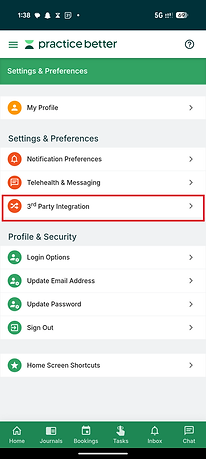

How to use the app

One: Your journal
Click the journal tab and you'll be able to log your activity, everything from the food you eat, your mood, to your daily water intake. Once you sync your wearable your coach can automatically see things like activity, sleep, and heart rate.
Make sure you're also regularly logging your biometric measurements in the measurements section, including your weight, body fat percentage, muscle mass, blood pressure, and SpO2. If you have the EverWell Connect Kit, take your readings and log them here after each check-in. The more data your coach has, the more personalised and accurate your monthly review will be.
Get into the habit of adding as much information as you can. It might seem like a task at first, but your coach works from your unique data, so the more you log, the better the guidance you'll receive.
Two: Your tasks
In your tasks tab you'll see any task's your coach has requested you to do.
You can mark them as complete, add notes and upload any images or other relevant files directly from the task itself.


Three: Inbox
Your inbox contains any relevant notifications that has been sent by your coach. Be sure to check them regularly for any important updates. You'll see a red icon with the number of notifications for anything that is unread.
Four: Chats
Have something important that you need to ask or tell your coach and it can't wait? That's where the chat tab comes in. You can communicate directly with your coach and share any important updates or information they might need to know.
This is also where you'll receive your monthly review.
Each month your coach will send your personalised health report directly to this chat, covering your wearable data, biometric trends, and lifestyle recommendations based on your unique data. No appointments, no waiting rooms, just your review delivered straight to you.

Congratulations!
Your now all set up and ready to start your wellness journey with EverWell Health!
We look forward to working with you and watching your wellness improve over the time your with us.
Please make sure to log as much as you can, it really helps our coaches understand you, your lifestyle and requirements better.
If you have any problems setting up your account or integrating your wearable device please do not hesitate to contact us.
